Learning a language here
Say you are learning Japanese. Choose Learn, pick it, and the room arrives in Japanese with your own language one tap away. Everything below is what happens then. Chat is the other half and has none of this in it, on purpose.
Last updated 31 August 2026
Tap any word
Words in the language you are studying are tappable. Tapping one tells you what it means in that sentence, not what a dictionary says it means in general, which is usually the difference between understanding a line and not.
Keep the ones worth keeping. They are saved to your account and follow you into every other room you use.
A whole line can be kept the same way, for a sentence whose shape is the thing worth having rather than any one word in it. If the room corrected that line, what is kept is the corrected version.
Scripts you cannot read yet
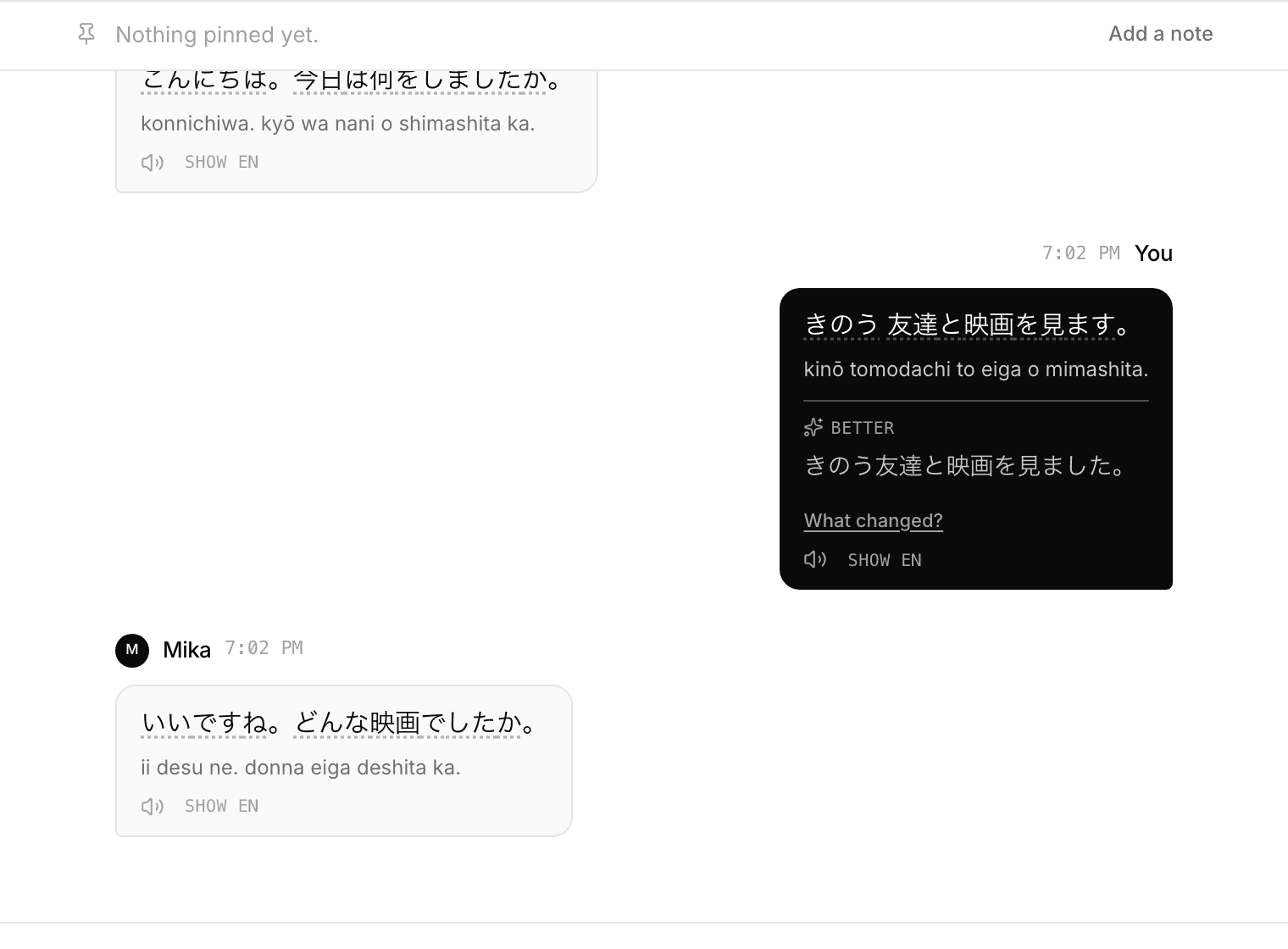
If the language you are studying is not written in the Latin alphabet, every message also shows how it is pronounced, written in letters you can read.
This covers Japanese, Chinese, Korean, Thai, Arabic, Hebrew, Greek, Russian, Hindi, Tamil, Amharic and every other non-Latin script in the list. A beginner can say a sentence out loud on their first day.
Corrections
When you write in the language you are studying, the room quietly marks how a fluent speaker would have written it. It corrects errors, not style, and it leaves your meaning and your register alone.
How much it corrects depends on how well you write. A beginner is told only what was wrong, because a page of corrections teaches nothing. Somebody comfortable in the language also hears about phrasing that reads unnaturally.
Under any correction on your own line you can ask what changed. It names the thing that was wrong and the rule to remember, in the language you read, in a sentence or two. Being shown the right version answers what, and this is the one that answers why.
In a lesson your tutor can mark a line themselves, and their correction replaces whatever the room had put there.
Reviewing what you saved
Saved words come back on a schedule, on the review screen. Words you get right move further away each time: a day, then three, then a week, then longer. Words you get wrong come back in ten minutes, inside the same sitting.
You do not have to open it. A word you use yourself in a conversation counts too, and it counts for more: producing a word is stronger evidence you know it than recognising it on a card.
If you would rather be told, the review screen can say when words are due, once a day. It asks your browser for permission the first time and nothing goes out until you have given it.
- Starting a room and inviting somebody
- How everyone reads in their own language
- Practising with Ren when nobody else is around
- Speaking instead of typing
- Reviewing the words you saved
- Finding out what you keep getting wrong
- Learning a language written in a script you cannot read
- Talking to somebody who does not share your language
- Keeping a room, and deleting a conversation
- Putting a translating chat room on your own site
- Using Cross Convo to teach